> For the complete documentation index, see [llms.txt](https://docs.coinkarma.co/llms.txt). Markdown versions of documentation pages are available by appending `.md` to page URLs; this page is available as [Markdown](https://docs.coinkarma.co/features-guide/token-screener-shan-zhai-bi-shai-xuan-qi.md).
# Token Screener(山寨幣篩選器)
## 什麼是 Token Screener(山寨幣篩選器)
Token Screener 為會員專屬頻道,每小時播報
 這個頻道將所有幣種依象限分為四類,並根據條件達成與否以顏色區分;未達條件的幣種顯示為白色,而 BTC 則固定以橘色標示在象限圖上。
 註1:RSI\_Dif = 跟 BTC RSI 相減的值:正值 = 較強;負值 = 較弱
註2:LIQ百分位 = 該幣種的 LIQ 在過去一個月的百分位數
## 如何運用 Token Screener
可以透過 Token Screener 頻道快速篩選出強勢幣種( 第一象限 )及弱勢幣種( 第三象限 )。
但即使篩選出強(弱)勢幣種,也須加以判斷整體大盤( 即 BTC,以下稱 BTC )的數據表現是否支持;在幣圈,目前各個山寨幣與 BTC 的價格連動性依舊非常強;即便某一個山寨幣本身的數據表現優異,但此時 BTC 價格走弱或整體市場數據偏空,該山寨幣的表現通常仍會受到壓制,難以獨自上漲,其主要原因為:許多山寨幣的交易對以 BTC 為基準(ALTs/BTC),因此即便 ALTs 對美元穩定,但 BTC 下跌時,ALTs/BTC 的表現仍可能不佳。
\
因此,在判斷山寨幣時,單看其各別數據是不夠的,還必須綜合考量 BTC 的整體數據。
## 具體操作
1. 透過 Token Screener 快速篩選強勢幣種、弱勢幣種 。
2. 觀察 Token Screener 的圖表中,BTC 處於 Y 軸 的何處;
* BTC 處於 Y 軸 越上方:圖表上的強勢幣種效力越強。
* BTC 處於 Y 軸 越下方:圖表上的弱勢幣種效力越強。
● 以下舉例:強勢幣種 及 弱勢幣種 的判別運用
* 強勢幣種( 2025/04/07 15:00 ) - $SUI
於 Token Screener 強勢幣種名單出現,並透過 Custom Signal 發現整體市場流動性數據支持 ( 綠色箭頭 ),後續 $SUI 走出驚人漲幅,大幅跑贏 $BTC。
註1:RSI\_Dif = 跟 BTC RSI 相減的值:正值 = 較強;負值 = 較弱
註2:LIQ百分位 = 該幣種的 LIQ 在過去一個月的百分位數
## 如何運用 Token Screener
可以透過 Token Screener 頻道快速篩選出強勢幣種( 第一象限 )及弱勢幣種( 第三象限 )。
但即使篩選出強(弱)勢幣種,也須加以判斷整體大盤( 即 BTC,以下稱 BTC )的數據表現是否支持;在幣圈,目前各個山寨幣與 BTC 的價格連動性依舊非常強;即便某一個山寨幣本身的數據表現優異,但此時 BTC 價格走弱或整體市場數據偏空,該山寨幣的表現通常仍會受到壓制,難以獨自上漲,其主要原因為:許多山寨幣的交易對以 BTC 為基準(ALTs/BTC),因此即便 ALTs 對美元穩定,但 BTC 下跌時,ALTs/BTC 的表現仍可能不佳。
\
因此,在判斷山寨幣時,單看其各別數據是不夠的,還必須綜合考量 BTC 的整體數據。
## 具體操作
1. 透過 Token Screener 快速篩選強勢幣種、弱勢幣種 。
2. 觀察 Token Screener 的圖表中,BTC 處於 Y 軸 的何處;
* BTC 處於 Y 軸 越上方:圖表上的強勢幣種效力越強。
* BTC 處於 Y 軸 越下方:圖表上的弱勢幣種效力越強。
● 以下舉例:強勢幣種 及 弱勢幣種 的判別運用
* 強勢幣種( 2025/04/07 15:00 ) - $SUI
於 Token Screener 強勢幣種名單出現,並透過 Custom Signal 發現整體市場流動性數據支持 ( 綠色箭頭 ),後續 $SUI 走出驚人漲幅,大幅跑贏 $BTC。
 * 強勢幣種( 2025/04/07 15:00 ) - $DOGE
於 Token Screener 強勢幣種名單出現,並透過 Custom Signal 發現整體市場流動性數據支持 ( 綠色箭頭 ),後續 $DOGE 走出驚人漲幅,大幅跑贏 $BTC。
* 強勢幣種( 2025/04/07 15:00 ) - $DOGE
於 Token Screener 強勢幣種名單出現,並透過 Custom Signal 發現整體市場流動性數據支持 ( 綠色箭頭 ),後續 $DOGE 走出驚人漲幅,大幅跑贏 $BTC。
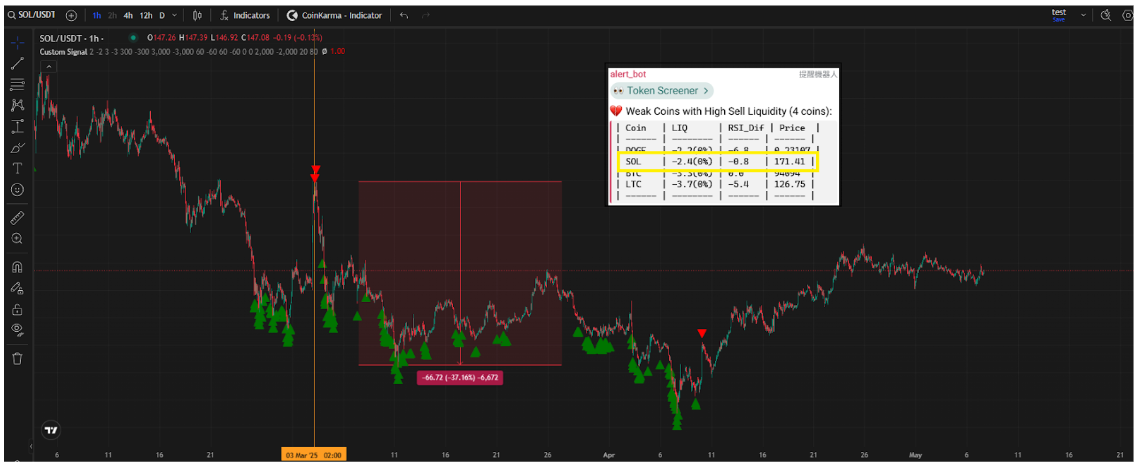
 * 弱勢幣種( 2025/03/03 02:00 ) - $SOL
於 Token Screener 弱勢幣種名單出現,並透過 Custom Signal 發現整體市場流動性數據支持 ( 紅色箭頭 ),後續 $SOL 出現大幅回調,跌幅超過 $BTC。
* 弱勢幣種( 2025/03/03 02:00 ) - $SOL
於 Token Screener 弱勢幣種名單出現,並透過 Custom Signal 發現整體市場流動性數據支持 ( 紅色箭頭 ),後續 $SOL 出現大幅回調,跌幅超過 $BTC。
 * 弱勢幣種( 2025/03/03 02:00 ) - $LTC
於 Token Screener 弱勢幣種名單出現,並透過 Custom Signal 發現整體市場流動性數據支持 ( 紅色箭頭 ),後續 $LTC 出現大幅回調,跌幅超過 $BTC。
* 弱勢幣種( 2025/03/03 02:00 ) - $LTC
於 Token Screener 弱勢幣種名單出現,並透過 Custom Signal 發現整體市場流動性數據支持 ( 紅色箭頭 ),後續 $LTC 出現大幅回調,跌幅超過 $BTC。
 {% hint style="info" %}
**使用須知**
感謝您使用 CoinKarma,本平台提供的數據指標主要基於過去的歷史表現,無法完全預測未來的市場走勢。加密貨幣市場具有高度的波動性,使用者應盡慎評估風險,並為自己的決策負責。
{% endhint %}
{% hint style="info" %}
**使用須知**
感謝您使用 CoinKarma,本平台提供的數據指標主要基於過去的歷史表現,無法完全預測未來的市場走勢。加密貨幣市場具有高度的波動性,使用者應盡慎評估風險,並為自己的決策負責。
{% endhint %}